2008-10-13

Re-enable X11 on Max OS X

Every now and then Apple disables the TCP ports of the X server. I don't know why, but at least two updates from Apple disabled this now.

You know TCP is disabled if you do


netstat -na|grep 6000


and you see nothing. If X11 would be listening you should see something like:


tcp4 0 0 *.6000 *.* LISTEN
tcp6 0 0 *.6000 *.* LISTEN


Also when you try to start an X11 app (like xcalc) from the terminal and you have set the DISPLAY variable to localhost:0, then you will see this if the X server is not listening on TCP (after a few seconds):


Error: Can't open display: localhost:0


To enable TCP on the Xserver type this into a terminal:


defaults write org.x.X11 nolisten_tcp 0


and then restart you X server. Now xcalc should start immediately.

2008-10-07

MacBook Pro eject key delay

I just figured that I also need to install NoEjectDelay from the same website to get rid of the eject key delay, but the key repeat still does not work for the eject key (now forward delete key).

Remap small enter key to Alt (option) on MacBook Pro

The small enter key on older MacBook Pros is completely useless. Newer MacBook Pros have an option (Alt) key there instead which makes more sense.

With KeyRemap4MacBook you can remap many keys. It has a static list of possible key remappings which you can choose from, but they seem to cover a lot of use cases, You can also remap the eject key (which si also useless) as 'Del' (forward delete), but this does not work well for me as this key still has the delay and no key repeat.

Anyway, having a second option key is great and reason enough to install this:

http://www.pqrs.org/tekezo/macosx/keyremap4macbook/index.html

Duplicates after import in iTunes

I recently repeatedly experienced duplicates in iTunes after importing directories of mp3 files. Almost all files (but not all) would be visible twice in iTunes and they would also exist as two distinct files in the iTunes library, but the files would be identical. Some files even would be visible three times.

I now found what is the cause: An m3u playlist in the directory will cause all the file in that playlist to be impoted and in addition all mp3 files in that directory are also imported, hence all files in the m3u list will appear twice.

The solution is to erase all m3u files (or all non-mp3 files) before importing directory structures.

Ishkurs Guide to Eletronic Music ...

... can be found here now:

http://techno.org/electronic-music-guide/music.swf

(The link in the older post does not work for me at least on my Mac using Safari.)

2008-09-24

PacMan Statistics


BTW: 75% of all statistics are useless! :-)

2008-06-27

2008-01-14

HowTo: PC-Style keyboard mapping on Mac OS X (german keyboard)

The keymap on a german keyboard attached to a Mac is rather different that what people expect from a standard Linux or Windows PC. This is very irritating for novices and geeks at the same time. Especially if you program a lot you miss the braces and the brackets, but most of all you miss the backslash, the pipe symbol, the tilde and the AT symbol. Apple! How dare you! The backslash on a german keyboard is Alt+Shift+7! Argh!

Anyway, these days are over. Here is how to get a pretty standard PC-Style keymap alongside the old Apple bindings if possible:

1. mkdir ~/Library/KeyBindings (if it does not exist)
2. put the following text into the file Library/KeyBindings/DefaultKeyBinding.dict
3. Log out and log in (some apps like TextEdit pick up the changes directly when you restart them)


{
"\UF729" = "moveToBeginningOfLine:"; /* pos1 */
"^\UF729" = "moveToBeginningOfDocument:"; /* crtl + pos1 */
"$\UF729" = "moveToBeginningOfLineAndModifySelection:";
"\UF72b" = "moveToEndOfLine:"; /* end */
"^\UF72B" = "moveToEndOfDocument:"; /* ctrl + end */
"$\UF72B" = "moveToEndOfLineAndModifySelection:";
"\UF72C" = "pageUp:";
"\UF72D" = "pageDown:";
"^~7" = ("insertText:", "|"); /* orig alt 7 */
"^~8" = ("insertText:", "{"); /* orig alt 8 */
"^~9" = ("insertText:", "}"); /* orig alt 9 */
"^\U00DF" = ("insertText:", "\U00BF");
"^+" = ("insertText:", "\U00B1");
"~<" = ("insertText:", "|");
"~7" = ("insertText:", "{");
"~0" = ("insertText:", "}");
"~8" = ("insertText:", "[");
"~9" = ("insertText:", "]");
"~+" = ("insertText:", "~");
"~\U00DF" = ("insertText:", "\U005C");
"~q" = ("insertText:", "@");
"^x" = "cut:";
"^c" = "copy:";
"^v" = "paste:";
}


This gives you the braces, the brackets, the backslash, the pipe symbol, the AT symbol, the tilde, Home/End on PC typical key combinations. It also gives Ctrl+X, C, V for cut/copy/paste in addition to Command+X, C, V. Most of the Apple key combinations still work after this change, so Mac users would still find their way in your system. The most noticeable change is Alt+7 for the pipe symbol which is now the opening brace.

I got all the info from this german page:

Tastaturbelegung unter Mac OS X

which provides a very useful example keymap (which I extended a bit above) and a link to this great page:

http://www.lsmason.com/articles/macosxkeybindings.html

The latter one provides virtually all the background information you need to do your own keymaps.

Happy keymapping!

Change keyboard type button missing in System Preferences

After playing with the keyboard type (I don't remember exactly what I did) I had a nasty keyboard type/mapping problem on my MacBook Pro (Max OS X Leopard 10.5.1):

From some point on the two keys (<> and ^° in my case, german keyboard) where swapped. All other keys were normal, so it was not a keymap problem. The german keymap worked well except for these two keys which were swapped. Stangely enough the button to undo this change 'Change keyboard type ...' *vanished* from the System Preferences! I could not believe this until I verified that on other Macs this button is present. I don't understand why. Apple: Never do these configure once things!

Starting the KeyboardSetupAssistant did not help at all since it would say that all known keyboard were configured. Thanks.

I found the solution in some Apple forum thread but I am replicating it here since it took me quite some time to find it although it looks quite obvious to me now:

1) Delete the file: /Library/Preferences/com.apple.keyboardtype.plist
2) Restart

After removing the file and restarting:

1. I could set the keyboard type correctly using the assistant and
2. I can now change the keyboard type again using the System Preferences

I don't know why this button was missing before ...

2008-01-03

Mac OS X 10.5.1 jnl: replay_journal: bad block list header

After a cold boot I reproducibly got into an infinite loop of the gray start screen. The boot-up sound would be played every 3 minutes continuously.

I pressed Apple-V to see what is going on and I got several messages indicating that the journalling on my root disk was corrupted:

jnl: replay_journal: bad block list header @ ...
jnl: journal_open: Error replaying the journal!
hfs: early jnl init: failed to open/create the journal (retval 0)

Booting in single user mode (Apple+S), doing an fsck -fy and an exit solved the problem temporarily. It would boot up without problems. But after a day and another cold reboot the problem was there again. My MacBook Pro would not boot and was stuck in the endless gray boot screen loop.

I think I now solved the problem by making it boot once (see above), then disabling the journal by doing

sudo diskutil disableJournal /dev/disk0s2

(This cannot be done in single user mode, you need to boot Mac OS X for this.)

Then I rebooted. No problem. Then I activated journalling using the disk utility and it works again. Rebooting cold now works fine. Let's see what the future brings.

But: Apple: Please. How hard can it be. Please make your stupid fsck program deal with such a situation instead of continuously rebooting. This is a showstopper bug for a lot of users. Filesystem checks must never assume the filesystem including any journal is OK!!! This is sounds rather obvious to me.

2007-12-12

Printing from Mac (Leopard) on a printer connected to Ubuntu Linux

Here I found the solution how to print from my MacBook Pro on a shared printer which is connected to a Ubuntu (7.10) Linux box.

The printer on the Ubuntu box needs to be shared. The gnome printer administrations GUI tools are sufficient for this. Just enable the two network sharing and printer detection options.

Test from the Mac whether you can see the cups system on the Ubuntu machine: Open Safari at http://myubuntuhost:631. If you can see your printer. If not your Ubuntu printer is not working even on the Ubuntu system.

Since I upgraded to Leopard I could not see/access/configure the remote printer in any way, until I read the page linked above and made the following chnages:

On the Mac side, add/change these lines in the file /etc/cups/cupsd.conf:

Browsing On
BrowseOrder allow,deny
BrowseAllow all
BrowseRemoteProtocols all
BrowsePoll IP_OF_YOUR_SERVER:631
BrowsePort 631


Then reboot the Mac.

Now when you try to print something you may notice that all your printers are gone on the Mac. But when I tried to select a printer a new printer was automagically added after a few seconds. The new printer had the name MYPRINTER @ MYMACHINE so it is easy to recognize whether this worked or not.

2007-10-24

Being brave ...

... sometimes means you *are* looking for trouble.

Obey the sign!

Germans like signs very much. Too bad this one is in english. :-)

USA


Ignorance is bliss ...

2007-08-30

Ishkur's Guide to Electronic Music:

http://www.di.fm/edmguide/edmguide.html

This page is great: Samples from all kinds of electronik music, really *all* kinds. And a map how they are related and where they originated from. And entertaining texts explaining objective and not so objective facts. :-)

2007-02-27

Pendulum

Two great music videos:

Pendulum: Slam

The Prodigy: Voodoo People (Pendulum Remix)

We're going to rock civilization! Yeah. :-)

2006-12-25

Mac OS X Tiger 10.4.x: Color profile - fast user switching bug

When using the fast user switching feature of Mac OS X 10.4.x (x == 1 to 8 at least) there is a nasty bug which screws up the color profile settings (if you use a custom color profile, which is very likely if you use a LCD screen).

The bug appears like this:
- you log in: color profile OK
- you switch to another user: color profile OK
- you switch back to the original user: color profile screwed up and can not be reset by the obvious means in the system settings

I found a workaround here which works pretty well:
http://www.macosxhints.com/article.php?story=20060103162354164

Thanks a lot for sharing this!

In short:
- to fix the problem temporarily (e.g. fix the color profile) start
/System/Library/Frameworks/ApplicationServices.framework/Versions/
A/Frameworks/CoreGraphics.framework/Versions/A/Resources/DMProxy
- to fix it permanently add this to the startup objects for all users

Have a colorful day!

2006-12-17

Flash player screwed up on Mac OS X

Today I tried to watch youtube.com on my Mac Mini running Mac OS X Tiger 1.4.8 but I was hearing no sound. The video is played using some flash plugin (which sucks). The sound setting on my machine seemed ok since all other apps were playing sound fine.

Google found some hints here:

http://fredericiana.com/2006/06/14/flash-video-and-no-sound-on-osx

But none of the hints would solve my problem exactly. The key seems to be the Audio MIDI Setting application. Open a shell and type:

open "/Applications/Utilities/Audio MIDI Setup"

Twiddling with the volumes at the bottom of the first pane and setting the output device correctly solved the problem for me. Others reported that they needed to (re-) set the sampling rate to 44100.

This is of course only a workaround. This Flash stuff is real crap as always. You always need the newest version to be able to do stuff you could easily do without it. And it prevents you from doing useful stuff which you could do without it, all for commercial reasons. It does not play fullsreen fluently on my 1.25 GHz iBook while this plays DVD with much higher bitrate and framerate fine, i.e. it does not use the hardware scaler. This crap sucks.

By the way: This is exactly the type of behavior I expect from Windows machines: Install something and something completely unrelated breaks. Apple: Please make this more robust!

So long ... happy youtubing! :-)

2006-11-11

HP 2550 toner empty?

The HP Color LaserJet (CLJ) 2550 / 2550L / 2550LN uses the toner cartridges Q3960A, Q3961A, Q3962A and Q3963A. The printer stops printing after some defined number of pages although the toner is not really empty. This is really annoying. The HP toner is very expensive and the toner cartridges which are supposed to last for 4000 (5000 black) pages only last for about 2000 pages in practice (at least for me).

To make use of the remaining toner there is a workaround. This requires tampering with the toner cartridges and you will loose the warranty for your device. You may also damage your device, so do not do the following if you do not know what you are doing!

Disclaimer: Do not follow any of the procedures below! They are unsafe. You have been warned!

When the LED is flashing for some toner cartridge: Take it out and swap the chip with the chip of some other toner cartridge of a different color. This can be from an empty toner cartridge. It's a good idea to mark the chip with the original color as it cannot be used for this color in the future. The printer will now claim that there is a non-HP toner in the printer, but it will print as normal. The LED of that cartridge will be off. When I did this for the black cartridge I always had to switch the printer off after each print job as it would recognize a fault on black. I also had to open and close the paper compartment every 50 pages or so. Btw, this also helps when one of the toners gets empty (blinking) during a long print job: When the printer stops open and close the paper compartment, then it will continue to print. You need to take care of the image quality yourself now of course. Destroying the chip with 12V did not work for me for the toner cartridges.

For the imaging drum swapping the chip did not work for me. But destroying the chip by applying a Voltage of 12-14V for 10 seconds to the two pads worked for me. The drum LED is now also off and recognized as non-HP. I also needed to get the old toner out of the imaging drum: It can be opened by removing the screws from one side and removing the white gears and the cover of the old toner compartment. This was very tricky to do and I had to almost break the platic parts. I took out a long threaded platic part, The old toner causes a big mess! Do this outside! Wear old clothes! Use an old or industry vaccum cleaner to remove all of the old toner. Don't use you home vaccum cleaner for this, the toner goes thorugh all the filters. Do this outside! This may seriously damage and break your imaging drum. But it does not work anyway if the drum LED is blinking. I made the mistake of touching the white platic sheet, so I had my fingerprints on the first 10 pages I printed. However, they fade out by themselves. Avoid touching the imaging drum itself by any means.

The original ideas came from this german forum post: here.

My imaging drum still works perfectly (but only after I removed the old toner from it). And the toner cartridges can print many pages after they initially stopped printing!

BTW, all the hold keys down while switching on did not work for me at all!

Update: 2011-01-16:

Second imaging drum was depleated today. The last color pages printed were absolutely flawless. The locking mechanism is annoying. I tried to burn the cjip with 12V like the previous one, I even used the burnt chip which worked on the previous drum, nothing worked. The drum LED would blink and the printer was not ready. Pressing cancel didn't help and also all the 'hold down buttuns which powering on' stuff did not work at all. No effect.

I finally (already prepared the throw the whole thing into the trash including 4 new toners) tried an old empty chip from a yellow toner. This worked! The drum LED was blinking and the attention light was on. Pressing cancel cleared both LEDs. Now the drum LED is off and the printer print again. (For the first page there is no ready light though. However this cured itself later as well, nit sure when.)

My conclusion is: Do not buy HP printers. You will get a big pile of trash for a lot of money. Looking back the years, HP2550: Expensive toner, expensive drums, lots annoyances, lots of paper jams from bottom compartment. Very slow printer. Crappy HP printer driver (always prints color pages, also for BW pages). Bad support for Mac OS X.

2006-08-08

Apple security update breaks Mail and Safari

Apple, what have you done. A black day in Apple history. :-)

After installing the Apple Security update 2006-004 I had problems starting Mail.app and Safari.app on my iBook. The problem report I sent to Apple said:


Symbol not found: __ZN3KJS9ObjectImpC2Eb
Referenced from: /System/Library/Frameworks/WebKit.framework/Versions/A/Frameworks/
WebCore.framework/Versions/A/WebCore
Expected in: /System/Library/Frameworks/WebKit.framework/Versions/A/Frameworks/
JavaScriptCore.framework/Versions/A/JavaScriptCore


The rest of the system seemed fine, and I was able to use Firefox to find this simple solution (after tons of useless problem reports without solution):

Just install the MacOS X Update 10.4.7 Combo PPC update again. This solved the problem for me. Of course I don't have the security update anymore, but quite frankly, I can live with that.

Btw, I found this solution on another blog.

On days like these I really like blogs.

Happy installing,

icode

2006-07-26

Bombs

Stop the bombing! Every bombing destroys lives unselectively. No bomb has ever lead to a better world. Never, ever. No matter which nation ever sends bombs under which condition. It's just horrible. It takes 3 generations at least to forget the violence. In the end, it's a lose-lose situation. Many deaths and the feeling of great injustice on both sides.

Please, stop now! Every damage not done makes the situation less complex and the future more worth living. The true solution is in peace, deescalation, passiveness, self-control, understanding, helping and in the end love.

Make love not war!

This had to be said. I feel a little better now.

2006-07-09

Worldcup 2006

Congratulations Italia. The final was not a very good game to remember, but italia deserved the thin win in the end in the penalties. I still have no idea what has bitten Zidane who saw the red card after a head assault. This did certainly not help the french team.

The game for the third place (the small final) between Portugal and Germany yesterday was much better. Usually these games tend to be boring. Congratulations go to both teams which gave everything in an interesting game with many goals.

Special thanks go to the german team for playing so well during the whole worldcup: You gave us back our national flag and a part of our national identity. Now let's hope we qualify for the Euro 2008.

;-)

2006-07-03

Torsten Frings misses match against Italy

Honestly, I can not believe it. The german football player - Torsten Frings - got suspended for one game in the worldcup after the FIFA committee reviewed video material broadcasted by the italian owned pay TV station Sky. He is accused of hitting the argentinian player Julio Cruz in the face. He has been found guilty, although 3 official referees did not see anything and even Julio Cruz himself claims that he felt nothing.

How can this be? Why was video analysis only for this game? How can somebody be found guilty if the alleged victim himself claims there was no harm done?

I get the strong feeling something is going on there ...

OK, I'd better stop before this gets ugly .. :-)

2006-06-28

Lousberglauf Training

Today 32 minutes door2door for the usual round without looping on the top but along the columns. That looks bad since the real Lousberglauf is even a bit longer. I guess I will not reach my ambitious goal to stay below 30 minutes for the first time.

The last two sundays I was running along the Pferderennbahn / Gut Leidenhausen(long round) and it took me 25:19 and then 24:25.

2006-06-27

Medion MDPNA 510T

I bought this toy yersterday for 299 at Aldi Süd and I am mostly satisfied (so far, not having tested this on a long trip).

What I like:
  • Cool SIRF III GPS receiver (if you have one of the pre 2006 Garmin GPS devices: This is like 1000 times better. I have full reception even in buildings (e.g. under a metal roof or under steel concrete, my Garmin would give up under the light shade of a tree). It seems to pick up all kinds of reflections and make use of them. Really amazing technology. It works perfectly even under metallized or heated windscreens.)
  • Early and precise voice messages. You don't need the display at all. (Even things like and early 'keep left' or 'keep right' on multilane streets.)
  • Bright display, high contrast colors for streets (the standard colors, yellow for motorways, red for Bundesstrassen and white for small streets).
  • Easy to use touchscreen: I never have to use the pen which comes with it.
  • TMC receiver helps to avoid traffic jams.
  • Fast responses to user input. Fast screen update. Feels very responsive.
What I dislike:
  • Navigation is limited to a 'map' (e.g. you have to manually change the maps when going from Cologne to Madrid).
  • Can not simply navigate to the next POI (e.g. gasstation) just by pointing at it.
  • Can not navigate to a point without having the address (e.g. by pointing at it or by entering the GPS coordinates).
  • Is lacking even basic GPS device functionality (waypoints, tracks, ...) although a GPS receiver is built in.
  • Can not move the map in 3D view (OK, the 3D view is not so important)
The only non-obvious feature I found so far:
  • You don't have to enter the complete addresses. Just a few letters are usually sufficient and you can select from a list if your information was not yet unique.
If all this is worth 299 EUR I don't know. But it's a nice toy.

It's like flying ...

This is exactly what I feel like very often:

Flying is to throw yourself at the ground and miss.
Douglas Adams

Faroe Islands


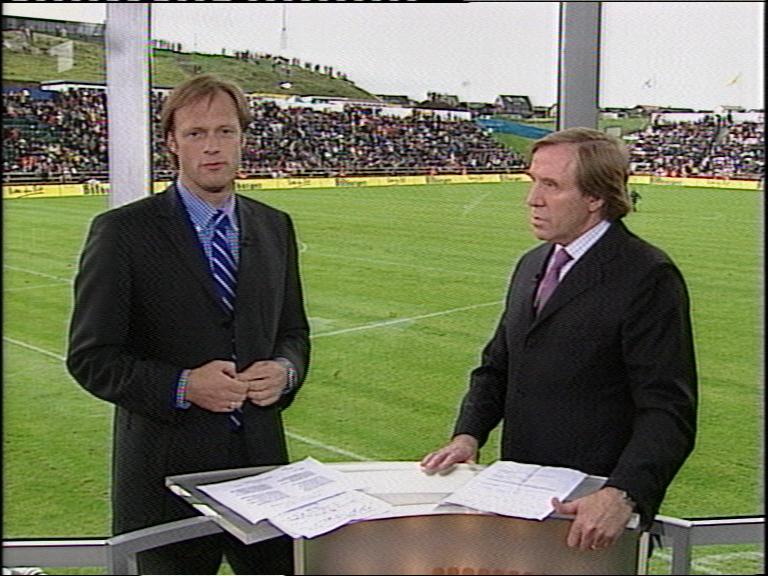
The italians winning over australia in the last few senconds of the game reminded me of an even more extreme football game which took place on Jue 11th 2003 in Tórshavn: Färöer against Germany. I will never forget this: A beautiful stadium inbetween green grassy hills. The game was not good, but the athomsphere alone was touching. Both teams were unable to score for the first 89 minutes! This was a big achievement of the Färöer team which played well. There was no justification at all for germany winning this game 0:2 in the end. Anyway, I took a few television snapshots back then showing the stadium in Tórshavn and Gerhard Delling and Günter Netzer analyzing the game (Günter excoriating the german team of course, as always).

I would love to go to the Faroes someday ...

Swiss: What a pity!

The swiss team lost against the ukraine after overtime and penalty shootout. What a pity! The underdogs almost made it! However, the ukraine is no less and underdog and I wish them all the best for their next game(s). Hopefully we will se the swiss again in 4 years!

Australia: You had one chance and you blew it!

Australia lost in the 1/8 final elimination round of the football world championship against a very weak italian team. They had a realistic chance of winning this thing. I'm not saying the austalians played better football, but they were the underdogs and they were not far from winning this game. This could have been the sensation of the event.

Anyway: Austalia, you have my deep sympathy. Hopefully we will see you again in 4 years in South Africa!

2006-06-25

The rock


Me holding a piece of rock in some tunisian desert. The rocks all looked black from the outside, so I split one to see that the color inisde is quite bright, like lime. Nothing of particular interest, except that it is one of the very few pictures in my archive where I am in front of the lens instead of behind the lens. It is just here to have a place for it in my blog profile.